AI, and specifically coding LLMs, are changing the way we work as a company in dramatic ways. If you had told me that Account Executives would be producing functional dashboards from scratch with real data in HTML format two years ago, I wouldn’t have believed you. But it is a daily occurrence for us now. Customer Success Managers (CSMs) create data-driven Customer Business Reviews (CBRs) and their own account dashboards to see the status of their accounts. Executives are building slide decks and microsites to circulate information, and the marketing team is building web-based go-karting games.
It’s amazing!
As the person responsible for data security, it is also terrifying!
The power of these tools is amazing, and the fact that all of the things above can be built by non-technical people is truly exciting. It is something we want to accelerate, not slow down, so I started thinking about what it would look like to build our own internal hosting system that was secure by default so that folks didn’t need to think about how to secure the assets they are building.
The Definition Phase
All of our projects these days start with a detailed definition phase, where we work with AI to build out the technical plan and requirements for what we want to build. This project was no different.
Before we started working with AI to refine the plan, I had already filled a whiteboard with notes and thoughts, and had discussions with several engineers to flesh out the ideas. We’ve found that thinking through things before starting is critical to having positive outcomes.
This was the starting prompt of the planning session:
Let’s create a plan for a simple internal sandbox deployment tool. Here is the rough shape of what I have in my mind so far, it consists of a few pieces. We have an aws account setup to house it with the zone *.intra.voze.com in its route53. That will be used for deploy mapping. The first piece is that we want to have an account wide ALB that enforces google oauth for the voze.com email domain. No one else should be able to access anything in this aws account. The websites will be static sites created by non-technical folks in the org using claude or other llms. The websites be uploaded via a drag and drop web form, that allows the uploader to provide the file, or a zip file of files, the subdomain they want it on (it should prevent overwriting a domain unless it is a domain that they created previously. The domains they created previously should be in a drop down on the form incase they are updating a site they already created. They should also be able to choose if the site is available to everyone, or a specific google group (which should be enforced when the site is requested). When the upload happens the asset should be stored in s3, the DNS should be setup if it isn’t already (probably store the assets in a folder with the DNS for its name). Requests to that domain should hit a lambda that retrieves the files and serves them, verifying that the user belongs to the correct google group if needed (maybe this happens in the ALB?).
After some work, the problem statement boiled down to this:
A self-service tool that lets non-technical Voze employees deploy static websites (built with Claude or other LLMs) to internal subdomains under *.intra.voze.com. Access is gated to voze.com Google accounts, with optional per-site restriction to a specific Google Group.
Armed with that thinking, and a refined understanding of what we wanted to build, it was time to iterate on the requirements in preparation for unleashing coding agents on it. So into agent collaboration mode we went, and after a dozen or so exchanges with Claude we had a clear 200-line requirements doc that would guide the agents as they built the system.
It spelled out details about authentication mechanisms, access controls, deployment, languages to use, infrastructure components, and much more. Here is the section for the lambda that ends up serving the files uploaded by the deploy site, so you can get an idea of what these docs tend to look like.
## Site Server Lambda

Handles all read requests for `*.intra.voze.com`.

1. Validate session cookie — redirect to auth if missing or invalid
2. Extract subdomain from `Host` header
3. Look up site config in DynamoDB
4. If `google_group` is set: verify user is a member via Google Directory API;
   return `403` if not
5. Map request path to S3 key (`{subdomain}{path}`, defaulting to
   `{subdomain}/index.html`)
6. Serve file with correct `Content-Type` header
AWS infrastructure makes a lot of this simple. They have created a powerful set of base infrastructure primitives that make previously difficult things easy. For instance, the custom DNS can be handled programmatically through their SDK, and a lambda can handle generic serving of content from an S3 bucket with security checks.
The total time spent on planning with AI was about 20 minutes, with another couple of hours in whiteboard discussions outside of AI.
The Build
Use a team of agent implementors (3-5 agents) and validation team (qa/security
2-3 agents) following the pattern in this prompt. You should break down the work
into smallest shippable pieces and populate their backlog. Keep them iterating
until all of the implementation is complete.

Team Guidelines

Task Workflow

One Task at a Time (CRITICAL)

Engineers must only claim and work on ONE task at a time.
✅ Correct workflow: 1. Check TaskList for available tasks 2. Claim ONE task using TaskUpdate 3. Complete the task 4. Mark as completed 5. Repeat
❌ Incorrect: Claiming multiple tasks simultaneously, starting without claiming, not marking complete.

Code Review Process

After completing tasks, review another engineer's work. Check for: functional
programming principles, error handling, lint compliance, test coverage, pattern
consistency.

Quality Standards

Before marking complete: linter passes, tests pass, TypeScript compiles,
functional programming principles, proper error handling, ≥95% test coverage on
changed code.

Team Composition

- 5 Staff Software Engineers for parallelizable implementation tasks
- 1 Staff QA for comprehensive testing and quality verification
- 1 Security Researcher for vulnerability detection and security audits
Sent to Claude Code in the terminal using Claude Sonnet 4.6. This kicked off five parallel agents, each claiming tasks from a shared backlog and working simultaneously — a QA agent and a security agent reviewed their output as they went.
Honestly, this was the boring part. I’ve used a prompt similar to this many times at this point, and it tends to just work. Within an hour or so, the agents had written the code, and it was time to deploy the infrastructure and start testing it out.
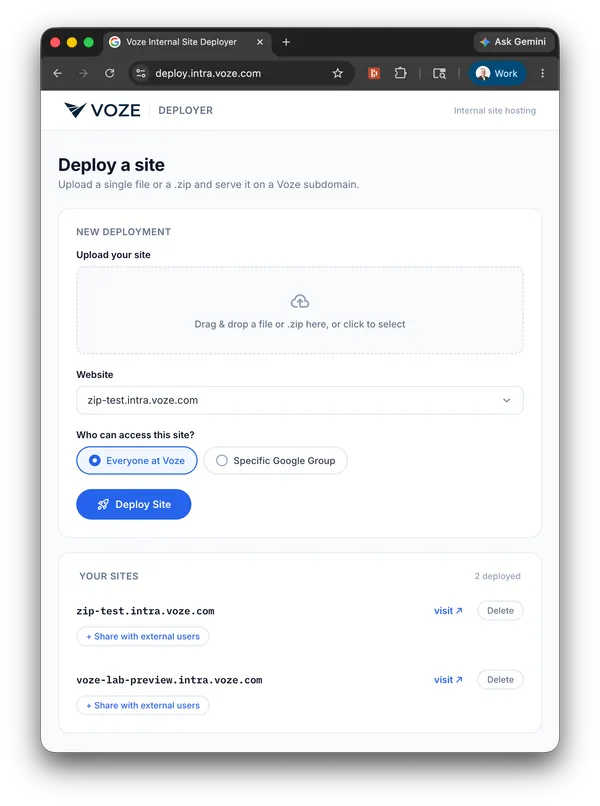
Using it is as simple as we could make it. Drop your HTML file or zip onto the form, pick the subdomain you want (or choose one you’ve used before from the dropdown), decide whether the site is for everyone in the company or just a specific Google Group, and hit deploy. The DNS, S3 storage, and routing all get wired up automatically.
Lest you be overly impressed by the polished design, this isn’t the first version of the site — our product team were some of the first people I showed it to, and they improved the design dramatically to what you see here. A little more prompting, and Claude reworked the site to look and work like this.
All in, the agents completed the implementation in about 30 minutes, ready for deployment.
The Architecture
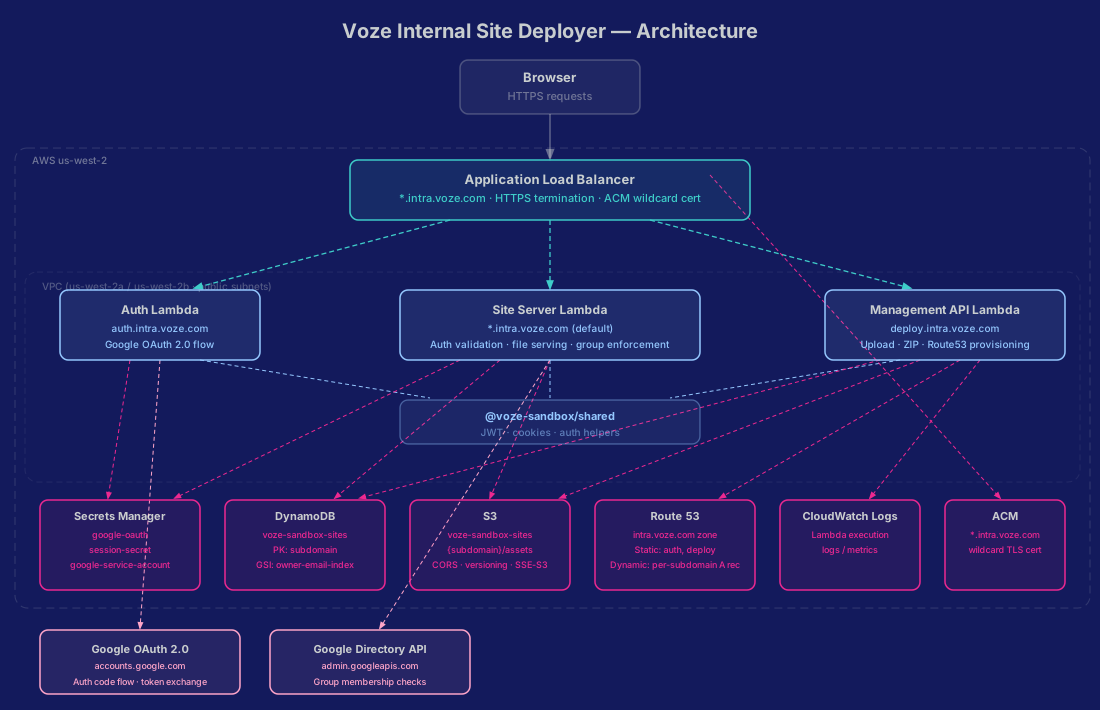
What we wound up with was three Lambda functions — an Auth Lambda handling the Google OAuth flow, a Site Server Lambda serving content from S3, and a Management API Lambda powering the deploy site — an Application Load Balancer (ALB), an S3 bucket, and very little else. These integrated with Google’s OIDC and Admin APIs to handle authentication and authorization.
Getting authentication right was one of the areas where the AI models struggled — more on that in Problem areas below.
Fine-Tuning Things
As everyone who has ever worked on anything knows, it’s not done until it’s done.
Some of the issues that we ran into were pretty simple, like the redirect issue. Others took some creativity, like dealing with the enormous HTML files that AI tends to produce.
Dealing with large files
If you are an engineer, you are probably having your LLM of choice follow best practices when building even small static sites. For people who haven’t spent their career thinking about download speeds, stability, and durable services, that isn’t the case.
This meant that for our target audience, the HTML files that were being produced often topped the 1 MB response size limit that the ALB enforces. That meant that some of our first test sites failed.
With some quick thoughts and small prompts, we changed the deploy Lambda to do some post-processing on uploaded index.html files. It would extract inlined JavaScript, base64-encoded images, and CSS, placing them all in external files and adding the correct imports to the file.
This combination has, so far, been successful in breaking down all the assets into sizes that can be served.
How do we make this even easier?
Our whole company has become used to working with custom skills in Claude (reusable instruction sets you wire into a project to shape how it responds). We use them for tone, design, and many other things, so the logical way to keep the experience simple was to create a skill that gave Claude the context to prep a site for deployment on our new tooling.
Bundle a web project into a deploy-ready zip and walk through
uploading it to the Voze internal site deployer at deploy.intra.voze.com. Help
the user bundle their web project and deploy it to the Voze internal site
deployer at https://deploy.intra.voze.com.
The full skill goes further, but this opening instruction captures the intent: bundle the current project for deployment and walk the user through the upload steps. It was another way to simplify the process and help drive adoption by making it as easy as possible.
Sharing outside the organization
Our Sales team and Customer Support team often share mini sites with customers and potential customers. Knowing that the first version of the system only allowed sharing within the organization, we needed to find a way to create shareable versions that they could use for those calls and demos.
Without this, adoption would have been slowed because it didn’t meet their current needs.
So we introduced a simple shareable link that can be activated per site. Under the hood it’s a token embedded in the URL that bypasses the Google OAuth and group checks — anyone with the link can view the site, no Voze account required. It defaults to off, and warns them of the risks before they confirm they want to turn it on to help maintain security. It can also be disabled at any point, which invalidates the previously shared links.
Problem areas
Not everything goes according to plan — especially when AI is involved. There were two areas that went sideways for this project: 1) redirect after authentication and 2) implementing the new design.
Redirect after authentication
If you’ve ever built an OAuth 2.0 integration from scratch, you know that redirect state is more complicated than it should be. That proved true again here.
The main symptoms of the issue were that if you were logged out and you tried to visit a site, you would correctly be sent to the auth lambda, and then incorrectly sent to the deploy site instead of the site you meant to go to.
This took at least three turns with the model to resolve, even knowing where the issue was likely located. It was a gentle reminder that understanding the systems you are building with AI is critical to being able to troubleshoot them and course-correct when models make relatively simple mistakes.
Implementing the new design
After we had the whole thing working, the product team were among our first users. They’re great because they weren’t going to stop using it if things didn’t quite work how they wanted initially, and could provide good feedback.
Some of the feedback they gave was in the form of an HTML file with a clickable prototype of a new design. It didn’t add new features, and was a simple reskin.
So we pasted the raw HTML into Claude Code and prompted it:
review this and apply its styles to the upload page please
The result was a visually accurate implementation that no longer worked.
It had missed a few things, among them:
- updating the CSP to allow for fonts from Google
- updating the JS code to work with the new DOM elements
Those were issues that were quickly identified as we tested it, and led to a few more turns with the model to get them resolved. Honestly, more of that could have been avoided had I written a better prompt.
One other interesting element we ran into was that the logo image had been base64 encoded in the prototype, and during implementation the model truncated the image data, breaking the logo and several other page elements. The fix was straightforward but manual — opening an editor, copying the full base64 string directly from the prototype, and pasting it into the correct place in the generated code ourselves.
Where it stands today
Done! That’s where it stands today.
In the first few days after its rollout, we have seen over 25 sites created, had team members cancel Netlify and Vercel accounts, and migrate their existing projects to it. Ultimately, that’s exactly what we’d hoped to accomplish. They now have a secure-by-default place to host their projects that helps us keep our data secure.
We’re not open-sourcing it, but the architecture is straightforward enough to reproduce if you want to try it at your own company.
Not bad for about six total hours of work for one engineer — planning, build, fine-tuning, and deploy included.
For papers, posts, and the curious.
BibTeX, plain text, and a permanent URL — for if you want to point your future self back here.
title = "How we built an internal sandbox to safely host non-engineers' AI projects in a day",
author = "Sellers, Daniel",
year = 2026,
series = "Voze Lab",
volume = 1,
number = 2,
url = "https://lab.voze.com/002-how-we-built-an-internal-sandbox-to-safely-host-non-engineers-ai-projects"
}